Factory Perspectives - Insider Views on Digital Factory Planning
Factory perspectives Insider views on digital transformation
The constant challenge of keeping factories up to date
Manufacturing is always evolving. Techniques, tools, technologies, and equipment—not to mention the products being made—all undergo continuous innovation. Staying competitive means factories must adapt to these changes with a more or less constant schedule of construction projects.
Coordinating all of the teams involved can be a difficult challenge to manage. Designers, architects, engineers, equipment providers, MEP firms, factory planners, and other stakeholders must all work together toward a common goal. But these teams often work separately, using fundamentally different systems to plan and execute their work.
This creates a situation in which any error—whether in file sharing, communication, or planning—could cause a conflict that delays the project or leads to cost overruns. Common examples include physical clashes, such as an assembly line slated to be installed where concrete columns are already positioned, or systems clashes, where a new piece of equipment fits in the allotted space but lacks connections for power or cooling.
Integrated factory modeling offers a fundamentally different approach to factory planning, one that replaces disparate technologies with a single source of truth for all stakeholders. As we will see, it is already helping manufacturers of all sizes plan and execute projects with fewer errors, lower costs, and much higher efficiency.
“Mistakes are costly. A lot of our large partners that do not use this type of workflow budget anywhere from 20% to 50% in overage cost on new construction. And we can get that to almost zero with integrated factory modeling.” Chris Mounts Director of Laser Scanning and CAD Services, PMC
Factories change constantly. But when construction teams work in silos using disparate tools, it can lead to clashes, delays, and rework. Integrated factory modeling offers a more efficient approach. See how one engineering pro has helped companies digitalize their processes to save time and reduce costs.
READ TIME
10 minutes
What is integrated factory modeling?
“We think of integrated factory modeling as a digital 3D factory, as well as the ability to collaborate using building information modeling, or BIM,” says Marc Banning, Business Development Executive at Autodesk. “Bringing the 3D factory together with collaboration is really what it’s all about.”
Integrated factory modeling is designed to connect, organize, and optimize all phases of factory projects, enabling the convergence of information about the building itself as well as the equipment and production lines inside it. By centralizing and standardizing data management for these complex projects, integrated factory modeling improves transparency, breaks down silos, and allows everyone from every department to work from the same set of data in real time. Ultimately, this leads to better decisions throughout the project lifecycle.
A realistic solution for any size manufacturer
While the concept is easy to grasp, the reality of integrated factory modeling is more nuanced. It starts with creating a digital model of the factory, often with help from professionals like Chris Mounts, Director of Laser Scanning and CAD Services at PMC. Chris has more than 20 years of experience designing, scanning, and modeling factories for a wide range of industries, including automotive, aerospace, heavy equipment, and more.
“At PMC, we were doing ‘digital twins’ from the beginning, nearly 40 years ago, with industrial simulation models,” he says. “Over time, that has evolved. My group specializes in building out digital twins, often from the ground up with no information. Our client base stretches from automotive all the way through every kind of manufacturing you can imagine.”
Integrated factory modeling is popular with very large manufacturers that are scanning and modeling shops that
exceed one million square feet. But it is also an accessible option for shops that are 10,000 square feet as well.
“With the big firms, we tend to have long-term engagements,” Chris says. “When we’re working with smaller firms, we’re doing a lot of training, getting their initial model developed, helping them pick out the right tools to get the work done, and then handing it off to them to maintain.”
The point here is that there is more than one way to pursue integrated factory modeling. It can be a viable solution for all kinds of manufacturers across a wide range of industries—not just the biggest.
Understanding the practical value of a factory model
The value of integrated factory modeling has many levels. One place to start is all the clashes and conflicts that happen in a typical factory project, whether it is adding a new processing technique, a new production line, or new equipment. Now think about the impact of stopping those mistakes before they ever start.
“The value of integrated factory modeling is certainty,” Chris says. “Mistakes are costly. A lot of our large partners that do not use this type of workflow budget anywhere from 20% to 50% in overage cost on new
construction. And we can get that to almost zero with integrated factory modeling, where the only change orders issued are because a key stakeholder changed their mind, not because a mistake was made or an instruction wasn’t understood properly.”
Integrated factory modeling allows faster time to market for new products and processes because it helps eliminate issues that can show up during the build phase. But it also eliminates the cost of fixing mistakes.
“Getting to production quicker is where a lot of the money is,” Marc Banning, Business Development Executive at Autodesk, says. “Depending on what you’re manufacturing, it can be a lot. If you’re making cars, it can be $10,000 a minute in profit. So completing the project faster is a big deal. So is reducing capital cost by catching mistakes early on and not having to spend money on them. I’ve seen early digital studies catch things we realized later saved a million dollars.”
Realizing you don’t have to cut the roof open any more
All of these benefits come into sharp relief when Chris shares an actual example of integrated factory modeling. The story starts with a manufacturer that had installed 5
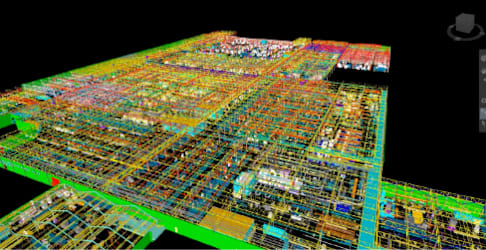
Large-scale production facility design review in Navisworks
identical heat treat furnaces. Due to the size of the furnaces, the company had to raise the roof, literally.
“They cut the roof out, stubbed up the columns, built a new truss, and framed it out,” he says. “We’re talking millions of dollars per furnace just in building modifications, not the actual equipment.” Then the company realized that a different approach—one that did not involve cutting a hole in the roof—could also work. But they needed to be sure.
After scanning the area and creating a 3D model, the company’s structural engineer confirmed that collapsing the truss, removing the bottom cord and lifting it up (instead of lifting the roof up) would work. The ability to show exactly how the new solution would work in an accurate 3D model was critical for achieving buy-in with the stakeholders in charge of making the decision.
“A lot of these decisions come down to how people feel,” Chris says. “If there is a fear that the furnace will show up and not work and production will be delayed for a couple months, they would rather throw a million dollars at the problem and use the previous approach. But we showed it in real time, visually positioning the furnace until everyone was comfortable.
Importantly, this was not a mock-up of the furnace—it is a furnace created with data from the manufacturer.”
Again, the ability to accurately visualize a creative solution in a collaborative 3D model not only saved a million dollars or more in construction costs, it saved 2 full months of project time.
Essential tools for integrated factory modeling
Manufacturers have a lot of choices when it comes to integrated factory modeling. The most important thing is starting with correct data. Laser scans—often outsourced—are commonly an affordable, high fidelity source, but when that’s not possible, converting 2D CAD data into 3D is an option.
Chris recommends 2 tools in particular. One is Autodesk Navisworks review and coordination software, which can visualize and unify design and construction data within a single federated model.
“Navisworks is where everything comes together,” he says. “I can take a million-square-foot-plus manufacturing plant and spin around inside it very easily. When you’re trying to coordinate an entire project, this is invaluable. I can throw point clouds in it, I can throw in pretty much every CAD product on the planet. If it were a couple years ago, I would’ve said this is the only tool you need.”
Today, however, he also recommends the Autodesk Construction Cloud, which realizes the “single source of truth” for all project teams in a more versatile way.
“Depending on what you’re manufacturing, it can be a lot. If you’re making cars, it can be $10,000 a minute in profit. So completing the project faster is a big deal.”
Marc Banning
Business Development Executive, Autodesk
Reviewing equipment placement in a production facility with Navisworks
Point cloud data from laser scan
“Construction Cloud is transformative,” he says. “It takes a long time to model a million square feet, and we would often struggle, shipping half-done files and pushing out updates later because the schedule was so tight. With Construction Cloud, we can work with these files live and keep pushing data in while the rest of the team is actively working in the same dataset. It’s so powerful, especially when it comes to the schedule. In manufacturing, the schedule is more important than money. And in all the time I’ve been doing this, Construction Cloud really compressed the schedule the most.”
Get started with integrated factory modeling sooner than later
Taking the first step toward integrated factory modeling can be daunting. Manufacturers may envision going all in, throwing out all of the software they use today and starting fresh. This could not be further from the truth.
“You don’t have to convert your whole enterprise overnight,” Chris says. “You can take your time. Just get one of your teams working in 3D and it will grow organically. Because once a team starts getting quick wins, the team that sits next to them is going to want to do the same thing.”
The key is to just get going, meaning choose a design tool and start the transition. At some point in the future, every construction project will be managed in a collaborative 3D environment. And eventually, that capability will extend to managing factory production as well. But not just yet.
“The sooner you get started on that journey, the sooner you will reach that point,” Chris says. “You don’t want to end up in a situation where your competitors are managing their operations completely digitally and you’re not.”
For more information, watch Chris presenting on this topic in a recorded webinar, or explore integrated factory modeling solutions from Autodesk.
Watch the webinar
Explore solutionsChris Mounts For over 20 years, Chris has designed, scanned, and modeled factories across numerous industries, including automotive, aerospace, and more. Today, he’s an engineering director at PMC.
Marc Banning Business Development Executive at Autodesk, has spent over 20 years providing strategic manufacturing insights in the automotive industry.
“You don’t want to end up in a situation where your competitors are managing their operations completely digitally and you’re not.”
Chris Mounts Director of Laser Scanning and CAD Services, PMC
Autodesk, the Autodesk logo, Autodesk Construction Cloud, and Navisworks are registered trademarks or trademarks of Autodesk, Inc., and/or its subsidiaries and/or affiliates in the USA and/or other countries. All other brand names, product names, or trademarks belong to their respective holders. Autodesk reserves the right to alter product and services offerings, and specifications and pricing at any time without notice, and is not responsible for typographical or graphical errors that may appear in this document. © 2023 Autodesk, Inc. All rights reserved.
https://www.autodesk.com/webinars/convergence/facilities-layout https://www.autodesk.com/industry/manufacturing/integrated-factory-modeling